Generates images from text
Description
ImageGeneratorPlugin is a plugin that lets you generate images based on textual information such
as a person's first and last name. It will then generate a kind of thumbnail or avatar
image by taking the initials of the name and generate an image that is automatically
colored. The algorithm for that is the same as in the
JQAutoColorContrib extension.
You type:
%GENIMAGE{"Foswiki"}%
You get:

You type:
%GENIMAGE{
   "John Doe"
   form="initials"
   style="border-radius:50%"
}%
You get:

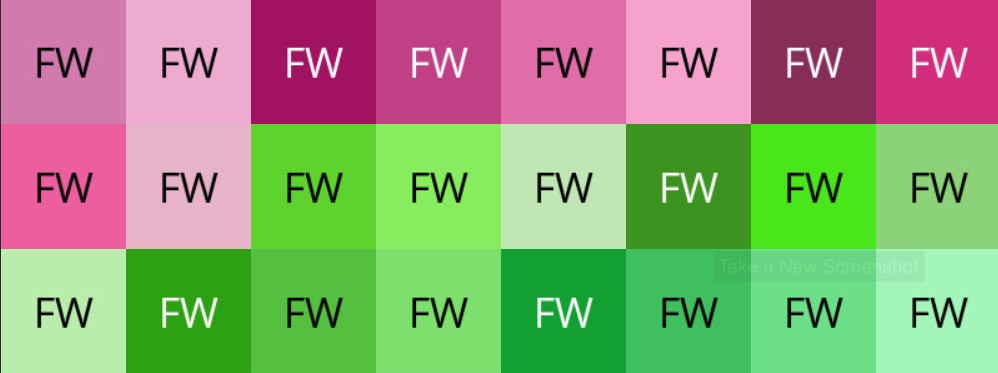
In additon to the text input say "FW" an additional seed may be used to create further
color variations.
You type:
%FORMATLIST{"0,1,2,3,4,5,6,7,8,9,10,11,12,13,14,15,16,17,18,19,20,21,22,23"
   format="$percntGENIMAGE{\"Foswiki\"
               label=\"FW\"
               seed=\"$1\"
               title=\"$1\"
               align=\"left\"
               width=\"100\"
               height=\"100\"
           }$percnt"
   separator=""
}%
%CLEAR%
You get:
Syntax
The
%GENIMAGE makes takes the following arguments:
| Parameter |
Description |
Default |
| "...", text="..." |
text source for the image; colors will be generated on its base |
|
| seed="..." |
any character sequence provided here will be added to the text while computing colors |
|
| size="..." |
imagemagick geometry; if unset params width and height take over |
|
| style="..." |
css styles |
|
| title="..." |
title attribute of the img elemenent |
|
| alt="..." |
alt attribute of the img elemenent |
|
| align="left/right/middle/top/bottom" |
alignment of the img elemenent |
|
| huefrom="0..359" |
start range of hues to be chosen from |
0 |
| light="..." |
HLS values of a foreground color to be used on a dark background |
0, 0, 100 |
| dark="..." |
HLS value of a foreground color to be used on a light background |
0, 0, 0 |
| lightness="..." |
one or more lightness values |
35, 50, 65, 80 |
| saturation="..." |
one or more saturation values |
50, 60, 00 |
| width="..." |
width of the image being generated |
150 |
| height="..." |
height of the image being generated |
150 |
| hueto="0..359" |
end range of hues to be chosen from |
359 |
| format="..." |
format string to render the result |
<img src="$url" \
     width="$width" \
     height="$height" \
     $class \
     $align \
     $title \
$alt /> |
| from="initials/firstletter" |
specifies the way a label is generated from the text: mode "initials" will extract the first letters from each word in the text; mode "firstletter" will take the first letter of the text |
firstletter |
| label="..." |
explicit label to be displayed, if undefined will use the from parameter to generate a label from the text |
generated from text |
| class="..." |
a css class |
genImage |
| font="..." |
ttf font to be used |
see configure, e.g. Helvetica |
All colors are calculated in HLS space. While hashing the text a hue value is selected in the range specified by
huefrom ...
hueto.
Lightness and staturation as selected in modulo fashion from the given list of values. The resulting background color
is analyzed: if it is considered dark or light, a light on dark or dark on light backgrounds will be used as can be seen
in the above examples.
Hue values are between 0 and 359, lightness and saturation are on a scale between 0 and 100.
The
format parameter may contain the following variables:
-
$url
-
$width
-
$height
-
$class
-
$align
-
$alt
Installation Instructions
You do not need to install anything in the browser to use this extension. The following instructions are for the administrator who installs the extension on the server.
Open configure, and open the "Extensions" section. "Extensions Operation and Maintenance" Tab -> "Install, Update or Remove extensions" Tab. Click the "Search for Extensions" button.
Enter part of the extension name or description and press search. Select the desired extension(s) and click install. If an extension is already installed, it will
not show up in the
search results.
You can also install from the shell by running the extension installer as the web server user: (Be sure to run as the webserver user, not as root!)
cd /path/to/foswiki
perl tools/extension_installer <NameOfExtension> install
If you have any problems, or if the extension isn't available in
configure, then you can still install manually from the command-line. See
https://foswiki.org/Support/ManuallyInstallingExtensions for more help.
Dependencies
| Name | Version | Description |
|---|
| Digest::HMAC | >=0 | Required |
| Image::Magick | >=7 | Required |
Change History
| 13 Jan 2025 |
added size parameter |
| 25 Jan 2024 |
initial release |



 jpeg
jpeg 


 Applications

 Copyright © by the contributing authors. All material on this site is the property of the contributing authors.